 |
You are
logged in as
anonymous Register |
 |
||
| ||||
| Home | History | Support | Articles | Screenshots | Download | F.A.Q. | Beta Area | Advertise here |
|
SpeedFan 4.52 Copyright 2000-2020 by Alfredo Milani Comparetti |

|
What is SpeedFan
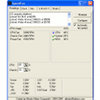 SpeedFan is a program that monitors voltages, fan speeds and temperatures
in computers with hardware monitor chips. SpeedFan can even access S.M.A.R.T. info and show
hard disk temperatures. SpeedFan supports SCSI disks too.
SpeedFan can even change the FSB on some hardware (but this should be considered a bonus feature).
SpeedFan can access digital temperature sensors and can change fan speeds
accordingly, thus reducing noise.
SpeedFan works fine with Windows 9x, ME, NT, 2000, 2003, XP, Vista, Windows 7, 2008, Windows 8, Windows 10 and
Windows Server 2012. It works with Windows 64 bit too.
SpeedFan is a program that monitors voltages, fan speeds and temperatures
in computers with hardware monitor chips. SpeedFan can even access S.M.A.R.T. info and show
hard disk temperatures. SpeedFan supports SCSI disks too.
SpeedFan can even change the FSB on some hardware (but this should be considered a bonus feature).
SpeedFan can access digital temperature sensors and can change fan speeds
accordingly, thus reducing noise.
SpeedFan works fine with Windows 9x, ME, NT, 2000, 2003, XP, Vista, Windows 7, 2008, Windows 8, Windows 10 and
Windows Server 2012. It works with Windows 64 bit too.
Hover on the icons to read more about specific SpeedFan features.
advertisement
News
SpeedFan 4.52 Final is online! |
SpeedFan 4.52 Final is now online! It adds support for a lot of new hardware. Bug fixes and more, as always. This version took quite a long time to see the light because of many things that happened. New versions will now appear more often. Stay tuned :-) Both the installer and the executable are digitally signed with my company's (SOKNO S.R.L.) certificate. If you download an installer that has not SOKNO's signature, then it is not SpeedFan! ...Enjoy! | |
Advanced Fan Control How-To |
An article has been added to describe the long awaited new Advanced Fan Control method. You can find
it here.
|
Release notes
| 4.52 | - | added full IPMI support |
| - | added full support for IT IT8771E | |
| - | added full support for Intel Sunrise Point (Z170) SMBus | |
| - | added full support for STMicro STTS2004 | |
| - | added full support for NCT6793D | |
| - | added full support for Giantec GT34TS04 and GT34TS02 | |
| - | added support for Atom E3800 SMBus | |
| - | added support for Atom C2000 SMBus | |
| - | added support for Fintek F71878A/F71868A at non standard addresses | |
| - | enabled SMBus on Intel 6 Series / C20x, if needed | |
| - |
How fan speed changing works
SpeedFan monitor temperatures from several sources. By properly configuring SpeedFan, you can
let it change fan speeds based on system temperatures. When choosing parameters for the minimum
and maximum fan speed, try to set them by hand (disable all the VARIATE FANs checkboxes) and
listen to the noise. When you hear no noise from the fan then you can set that value as the
minimum fan speed for that fan. I suggest to use 100 as the maximum value, unless you hear a
lot of noise from it, in which case you might reduce the maximum speed to 95 or 90. You can
set, say, 60 as the maximum value and, sometimes, I myself set it that way. Consider that when
the WARNING temperature is reached, the program sets the fan speed to 100, whatever maximum
speed you selected. One last word should be said regarding the USE FAN x listbox. In my pc,
more than one temperature changes when a fan runs faster. You can configure on which fan every
temperature should rely. On my system, TEMP1 and TEMP3 are both influenced by FAN1.
Credits
|
|
A few numbers...
SpeedFan can handle:
- almost any number of South Bridges
- almost any number of hardware monitor chips
- almost any number of hard disks
- almost any number of temperature readings
- almost any number of voltage readings
- almost any number of fan speed readings
- almost any number of PWMs
Disclaimer
This program is aimed at the power user. At those who know what they're doing. I've known of no
real problem caused by SpeedFan, but may be it's due to the fact that once it made the PC
explode and the user disappeared in the blast, thus being unable to report :-) Anyway: SpeedFan
can be extremely useful, but you should first watch its behavior before setting and forgetting it.
Feedback
You can contact me at alfredo [at] almico.com if you've got
any question or suggestion or discover any strange behavior. I'd appreciate an e-mail from those
of you who try and find useful my program. Just a line of text will do.
Thanx for your attention.
Thanx for your attention.
Links
You might consider to visit my Delphi Page.
| Page generated in 0.0505 seconds | Powered by (new)... | Page viewed 104581824 times |
| United States | Did you know that SpeedFan has an  feed?
feed? |
Privacy policy |